In my current organization, I am working on a model to sort post-consumer clothes to make them easier to recycle into products of different grades.
For example, if a post-consumer cloth has buttons and zippers and its quality is not great, we use it to make products like table cloths etc.
Since sorting is a critical step in the process, achieving high accuracy in the model is very important.
Collecting and accumulating enough clothes for training is a time-consuming task. To address this, we use synthetic data to train the model. The process involves training with synthetic data, fine-tuning with real-world data, and then evaluating the model on real-world data. This approach effectively mitigates the issue of data shortages.
We have developed a pipeline to generate synthetic data using generative AI models. The model selection is based on its compute efficiency and generative accuracy. The generative accuracy is assessed by testing the model on a sample set of inputs and performing a visual inspection to ensure quality.
This streamlined approach ensures that our model is trained efficiently while maintaining high accuracy and adaptability to real-world data.
Below are the steps that are involved in the pipeline.
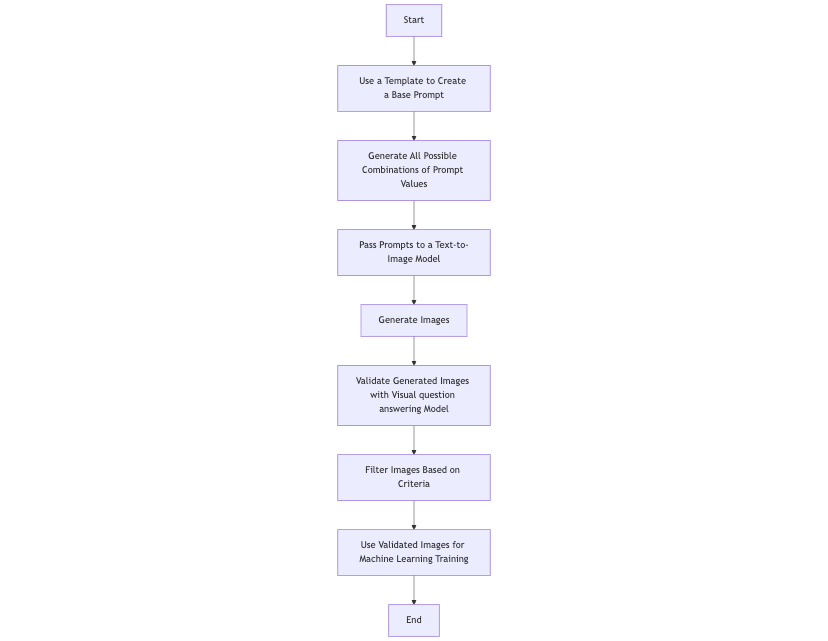
1. Use a Templated Base Prompt
- Start with a general prompt template that describes the type of images you want to generate.
- For example, the template could look like:
[COLOR] [DRESS_TYPE] with [FASTENER] placed on a [LOCATION]. - This template will guide the process of creating specific prompts by filling in the placeholders (
[COLOR],[DRESS_TYPE], etc.) with actual values.
2. Use All Combinations of Config Values in the Templated Base Prompt
- Take the values for each placeholder in the template, like a list of colors (red, blue, etc.), dress types (gown, sundress, etc.), and locations (wooden table, marble countertop, etc.).
- Combine these values in every possible way to create a variety of unique prompts.
- For example:
Red gown with buttons placed on a wooden table.Blue sundress with a zipper placed on a marble countertop.
- This process generates a large number of prompts, ensuring diversity in the generated images.
3. At the End of This Stage, We Have N Prompts to Generate Images For
- After combining all possible values, you’ll have a total of N prompts. These prompts represent all the variations you want to cover (e.g., different colors, dress types, fasteners, and locations).
- For instance, if you have 5 colors, 3 dress types, 2 fasteners, and 4 locations, you’ll end up with ( 5 \times 3 \times 2 \times 4 = 120 ) prompts.
4. Feed These Prompts Individually to the Text-to-Image Generation Model
- Pass each of these prompts, one by one, to a text-to-image generation model. The model used for my project was black-forest-labs/FLUX.1-dev.
- The model will generate an image for each prompt based on the prompt provided.
5. Send the Generated Image to an Visual question answering Model for Validation
- After generating the images, check if they meet your training data requirements using a validation model. For example, the model should verify:
- The dress in the image does not include any humans (not included this condition in the code sample).
- The dress is properly displayed on a flat surface as described in the prompt.
- We used the model openfree/claude-monet to ask specific questions about the image (e.g., “Is the dress placed on a flat surface?”).
6. Verify and Filter Images for Training
- If an image does not meet the criteria (e.g., contains humans, mismatches the description), it is discarded.
- Only images that pass all checks are included in the final dataset.
- This ensures the training data is clean, accurate, and suitable for the machine learning task.
I experimented with several models from the Hugging Face library and found that the models mentioned earlier best met my requirements for output quality and inference time. The results were evaluated through visual inspection on a sample dataset. Currently, I am exploring methods to verify if the generated images contain out-of-distribution (OOD) objects that could negatively impact the accuracy of the classification model used for sorting.
One of the key issues I am addressing is ensuring that the generated image matches the prompt. For example, if the prompt specifies a dress on a conveyor belt, but the generated image does not include the conveyor belt, the algorithm must detect this mismatch. To solve this, I am considering adding another layer of validation using segmentation models and filter out images with missing or incorrect objects.
For a more computationally efficient approach, I am investigating image processing techniques like the Histogram of Oriented Gradients (HOG). Since we know the dress color and the background surface (e.g., the conveyor belt), any additional objects in the image can be detected through their unique gradient histograms. This method provides a lightweight alternative for identifying discrepancies without relying on complex deep learning models.
By integrating these techniques, we aim to create a robust pipeline that ensures the generated data aligns with the intended prompts, ultimately improving the performance and reliability of the sorting model.
Code
main.py
import yaml
from itertools import product

from image_generator import TextToImageGenerator
from image_validation import ImageValidation

# Load the YAML data
with open('data_config.yaml', 'r') as file:
    data = yaml.safe_load(file)

BASE_PROMPT = "{} {} with {} placed on a {} without any other disturbing objects on the table"

# Extract the categories
colors = data['colors']
dress_types = data['dress_types']
trims = data['trims']
locations = data['locations']


# Generate all combinations
combinations = product(colors, dress_types, trims, locations)

# Print combinations
for combo in combinations:
    print(f"Color: {combo[0]}, Dress Type: {combo[1]}, Trims: {combo[2]}, Location: {combo[3]}")

    # Generate the prompt text using the provided combination
    print(BASE_PROMPT.format(combo[0], combo[1], combo[2], combo[3]))

    prompt = BASE_PROMPT.format(combo[0], combo[1], combo[2], combo[3])

    generator = TextToImageGenerator('black-forest-labs/FLUX.1-dev')

    # Load LoRA weights
    generator.load_lora_weights('openfree/claude-monet', weight_name='claude-monet.safetensors')

    # Generate an image from a prompt
    generator.generate_image(prompt, output_file="my_generated_image.png")

    ##############################################################################################

    # Image validation
    validator = ImageValidation()

    # Path to the image
    img_path = "my_generated_image.png"

    # Question to ask
    question = "Is the dress placed on a flat surface?"

    # Validate the image
    answer = validator.validate_image(img_path, question)
    print(f"Answer: {answer}")

    if answer == 'yes':
        # it is a valid image
        pass
image_generator.py
from diffusers import AutoPipelineForText2Image
import torch

class TextToImageGenerator:
    def __init__(self, model_name, dtype=torch.bfloat16):
        """
        Initialize the text-to-image pipeline with the given model.
        """
        self.pipeline = AutoPipelineForText2Image.from_pretrained(model_name, torch_dtype=dtype)

    def load_lora_weights(self, lora_weights, weight_name=None):
        """
        Load LoRA weights into the pipeline.
        """
        self.pipeline.load_lora_weights(lora_weights, weight_name=weight_name)

    def generate_image(self, prompt, output_file="output_image.png"):
        """
        Generate an image based on the given prompt and save it to a file.
        """
        image = self.pipeline(prompt).images[0]
        image.save(output_file)
        print(f"Image saved to {output_file}")
image_validation.py
from PIL import Image
from transformers import BlipProcessor, BlipForQuestionAnswering

class ImageValidation:
    def __init__(self, model_name="Salesforce/blip-vqa-base"):
        """
        Initialize the processor and model for Visual Question Answering.
        """
        self.processor = BlipProcessor.from_pretrained(model_name)
        self.model = BlipForQuestionAnswering.from_pretrained(model_name)

    def validate_image(self, img_path, question):
        """
        Validate an image based on a given question.

        Args:
            img_path (str): Path to the image.
            question (str): The question to ask about the image.

        Returns:
            str: The model's answer to the question.
        """
        try:
            # Load and preprocess the image
            raw_image = Image.open(img_path).convert('RGB')
        except Exception as e:
            return f"Error loading image: {e}"

        # Process the image and question
        inputs = self.processor(raw_image, question, return_tensors="pt")

        # Generate the answer
        output = self.model.generate(**inputs)
        answer = self.processor.decode(output[0], skip_special_tokens=True)
        return answer
data_config.yaml
colors:
  - Red
  - Blue
  - Black
  - White
  - Yellow
  - Green
  - Pink
  - Purple
  - Orange
  - Beige

dress_types:
  - Gown
  - Sundress
  - Cocktail Dress
  - Wedding Dress
  - Party Dress
  - Maxi Dress
  - Sheath Dress
  - Evening Dress
  - Wrap Dress
  - Tutu Dress

trims:
  - Buttons
  - Zipper

locations:
  - Wooden Table
  - Marble Countertop
  - Glass Desk
  - Vintage Dresser
  - Clean Workbench
  - Picnic Table
  - Polished Coffee Table
  - Tiled Table
  - Metal Desk
  - Dining Table
Sample output
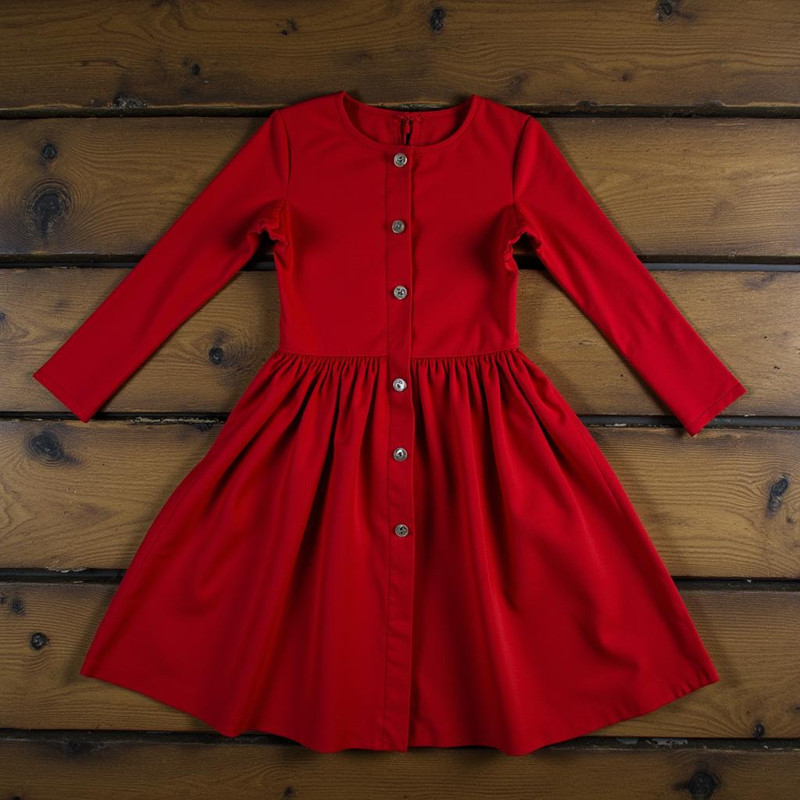
Prompt: Red Gown with Buttons placed on a Wooden Table without any other disturbing objects on the table
Good output:
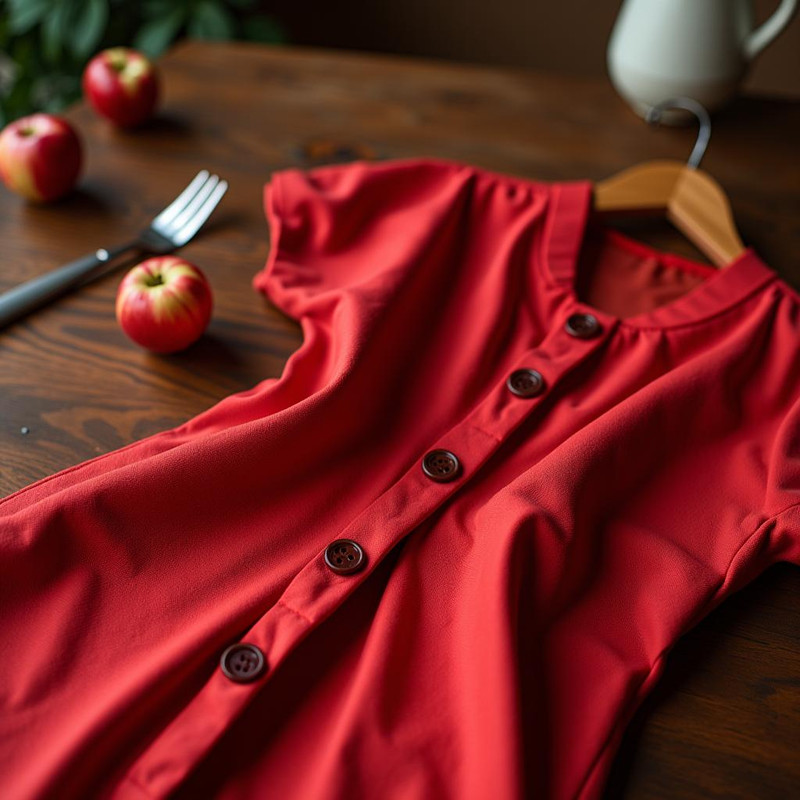
Bad output:
We can use the visual question answering model to detect out of distribution objects (apples, fork, cup, hanger) and filter out this image.
This is the framework we are currently using, and we are continuously exploring new techniques to enhance our synthetic data generation pipeline. I am excited to collaborate and contribute to any similar open-source projects. If you’re working on something aligned, please don’t hesitate to reach out to me—I’d love to connect and share ideas!